Writing Your First Test
Let’s create a simple test.
For the sake of demonstration, we’re going to use the Wikipedia iOS app for testing. In case you did not have the app under tmp/apps/Wikipedia.zip, you can simply run e2e demo build. This command clones the project and builds the app for you.
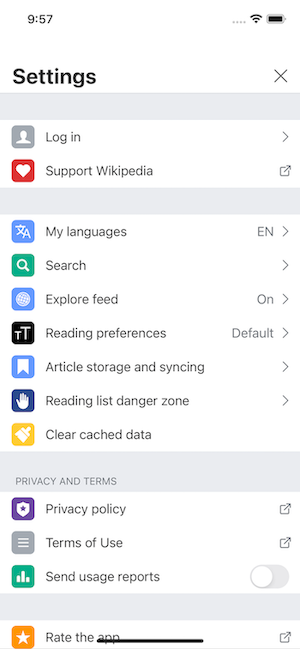
Let’s say we are testing the Settings screen in the app.
Creating a test function
First, create a new file called test_settings.py under tests/e2e directory.
In this file, write a test without doing anything at all.
def test_settings():
    pass
Then, try running this test. It should pass.
$ pytest tests/e2e/test_settings.py
So far, we have not specified anything related to the app. Hence, when running the test, you should not see the app being launched.
Using the tester fixture
Now, let’s add tester to the arguments of the test method.
For type hints, we can specify its type (as Tester) as follows:
from e2e_ext.core.tester import Tester


def test_settings(tester: Tester):
    pass
tester is a fixture provided by e2e-mobile. With this fixture, the app shall be launched upon testing. You can try running the test again to verify this. From there, we can perform UI assertions or actions.
Writing UI assertions and actions
The first thing we see when launching the app is the tutorial. Let’s dismiss it by tapping on the “Skip” button:
def test_settings(tester: Tester):
    tester.ui.button('Skip').tap()
Most of the time, the text we see on the screen can be used as the accessibility id/label. In some cases where the accessibility ids/labels do not seem obvious, we can just inpect the elements to know the value. Refer to Inspecting Elements for more details.
By inspecting the elements, we know the accessibility id/label of the settings icon ⚙️ is “Settings”. Tapping on this icon, we should see the Settings screen. In this screen, we expect to see some elements like “Log in”, “My languages”, “Explore feed”. The code for those actions and assertions are as follows:
def test_settings(tester: Tester):
    tester.ui.button('Skip').tap() # Dismiss the tutorial

    tester.ui.button('Settings').tap() # Tap the settings icon

    # Assertions: must see the setting items
    tester.ui.button('Log in').must_exist()
    tester.ui.button('My languages').must_exist()
    tester.ui.button('Explore feed').must_exist()
Now, let’s run the test again.
$ pytest tests/e2e/test_settings.py
Congratulations 🎉! You have succeeded writing your first test.